
Smart Course Recommendations for Work
Overview
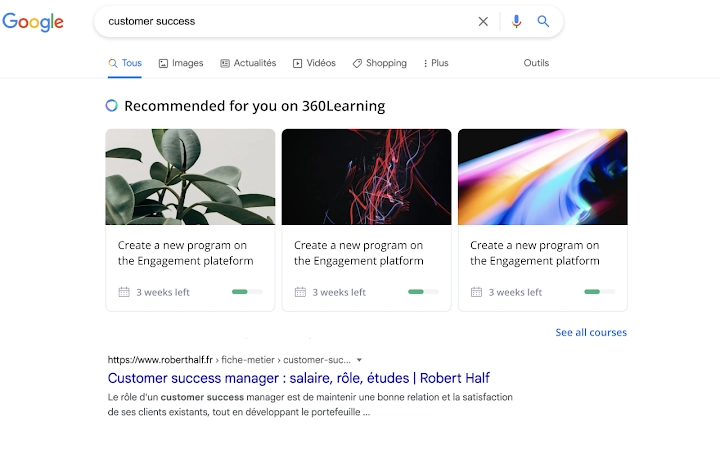
360Learning’s browser extension integrates seamlessly into daily workflows by delivering real-time course recommendations based on Google searches. Designed for professionals and teams within organizations, it helps users discover relevant learning opportunities without interrupting their current tasks. The tool addresses the common challenge of missed training opportunities by surfacing upskilling content directly within the search environment. This approach supports continuous learning, enabling employees to grow skills in context—whether they're researching industry trends, solving work problems, or preparing for client interactions.
Target users include corporate trainers, HR professionals, and team leaders focused on internal upskilling initiatives. The extension supports collaborative learning models where experienced employees can share knowledge through structured Academies. By combining LMS and LXP functionalities, 360Learning aims to create a self-sustaining upskilling flywheel across departments. The platform is particularly useful for onboarding new hires, training customer-facing staff, and empowering partners with consistent knowledge access—all within a unified system.
The developer did not provide additional details about the company’s history or organizational structure. However, the extension’s design suggests a focus on minimizing friction in learning adoption. Users can install the tool quickly and begin receiving recommendations after logging into their 360Learning account. Real-world usage scenarios include a marketing specialist searching for “best practices in digital campaigns” and instantly seeing a recommended course on the same topic, or a support agent researching a technical issue and being guided to internal training modules.
Key Features & Capabilities
- Contextual Course Recommendations – The extension analyzes search queries in Google and suggests relevant courses from the 360Learning platform. This allows users to access upskilling content exactly when it’s needed, reducing the gap between learning intent and action.
- Seamless Integration with Existing Workflows – By operating directly within the browser, the extension avoids context switching. Users remain in their current search environment while discovering training content, improving engagement and retention.
- Collaborative Learning Support – Courses are organized into Academies, enabling teams to co-create and share knowledge. This feature supports organizational learning cultures where expertise is distributed and continuously reinforced.
- Single Sign-On and Account Sync – After installation, users log in to their 360Learning account, which syncs their learning preferences and progress. This ensures personalized recommendations and consistent tracking across devices.
- Centralized Learning Management – The extension acts as a front-end interface to a broader platform that combines LMS and LXP capabilities, allowing administrators to manage training programs, track completion, and measure impact.
These features help organizations reduce training delays and increase participation rates. For example, a sales team member researching “negotiation techniques” might receive a course recommendation that leads to immediate skill application. Similarly, a new employee exploring “company onboarding procedures” could be directed to a curated learning path without leaving their browser.
User Interface, Workflow & Performance
The user interface is minimal and designed for low visibility until needed. The extension appears as a small icon in the browser toolbar, with recommendations displayed as inline suggestions beneath search results. Navigation is intuitive: clicking a recommendation opens the course in a new tab, maintaining the user’s original search context.
Workflow efficiency is enhanced by eliminating the need to navigate away from Google to find training content. The process is streamlined into three steps: install the extension, log in to 360Learning, and begin searching. This simplicity supports rapid adoption across teams. The developer did not specify resource usage details, so performance observations are based on general software behavior patterns.
Stability appears consistent with typical browser extensions, as the tool operates within the Chrome environment. No reports of crashes or memory spikes were noted in the provided data. CPU and RAM behavior are not publicly documented, but the small file size (1.2 MB) suggests lightweight operation. Users can expect minimal impact on system performance during regular use.
Compatibility & System Requirements
The extension is compatible with Windows and Mac operating systems, supporting both desktop environments. It is designed for use with Google Chrome, the primary browser platform for this tool. The installation size is 1.2 MB, which is typical for lightweight browser extensions.
Exact system requirements were not listed. Compatibility information was partially provided, indicating support for modern versions of Windows and Mac systems. No specific hardware requirements were specified. The developer did not provide additional details about minimum processor speed, RAM, or disk space needs. Users should ensure their system meets standard browser requirements for Chrome to run the extension smoothly.
Pros and Cons
Pros
- Delivers real-time, context-aware course recommendations during Google searches
- Minimal disruption to existing workflows
- Supports collaborative learning through structured Academies
- Small file size (1.2 MB) ensures fast installation and low resource usage
- Free to use, with no licensing barriers for teams
Cons
- Requires a 360Learning account to function—no standalone use
- Limited to Google Chrome browser
- Dependent on the availability and quality of courses within the 360Learning platform
- No information on offline functionality or cross-browser support
FAQ Section
Is the extension compatible with browsers other than Chrome?
The extension is currently designed for Google Chrome. No official support for other browsers was mentioned in the provided information.
Is the extension secure to use?
As a browser extension from a recognized developer, 360Learning, it operates under standard Chrome security protocols. Users are advised to only install extensions from trusted sources.
How often are course recommendations updated?
Recommendations are generated dynamically based on each search query. The frequency depends on user activity and the availability of relevant courses in the 360Learning platform.
Can I use this extension without a subscription?
The extension requires a 360Learning account to function. While the software is free to download, access to courses and features depends on the organization’s subscription to the platform.
Does the extension work offline?
Offline functionality was not specified. The extension likely requires an active internet connection to sync with the 360Learning platform and retrieve course data.
Final Thoughts + CTA
360Learning’s browser extension offers a smart, frictionless way to integrate learning into everyday work. By recommending relevant courses during Google searches, it turns passive research into active upskilling. The tool excels in supporting continuous learning cultures, particularly within organizations focused on internal growth and collaboration.
While it is limited to Chrome and requires a 360Learning account, its lightweight design and seamless integration make it a valuable addition to any team’s productivity stack. The free pricing model lowers adoption barriers, making it accessible for growing teams and training departments.
For professionals and organizations committed to upskilling from within, this extension delivers tangible value by meeting users where they are—on Google. Download 360Learning’s browser extension now.







